Klakwall
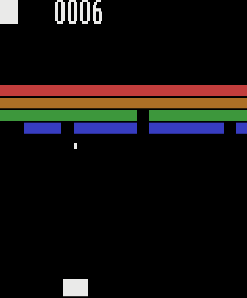
A bat, a ball and a wall of bricks that will not wait. Every two and a half seconds the wall takes a step down the screen, and when it reaches the bat the game is over.
From Atari 2600 Assembly
From the MOS 6507 to Two Complete Games
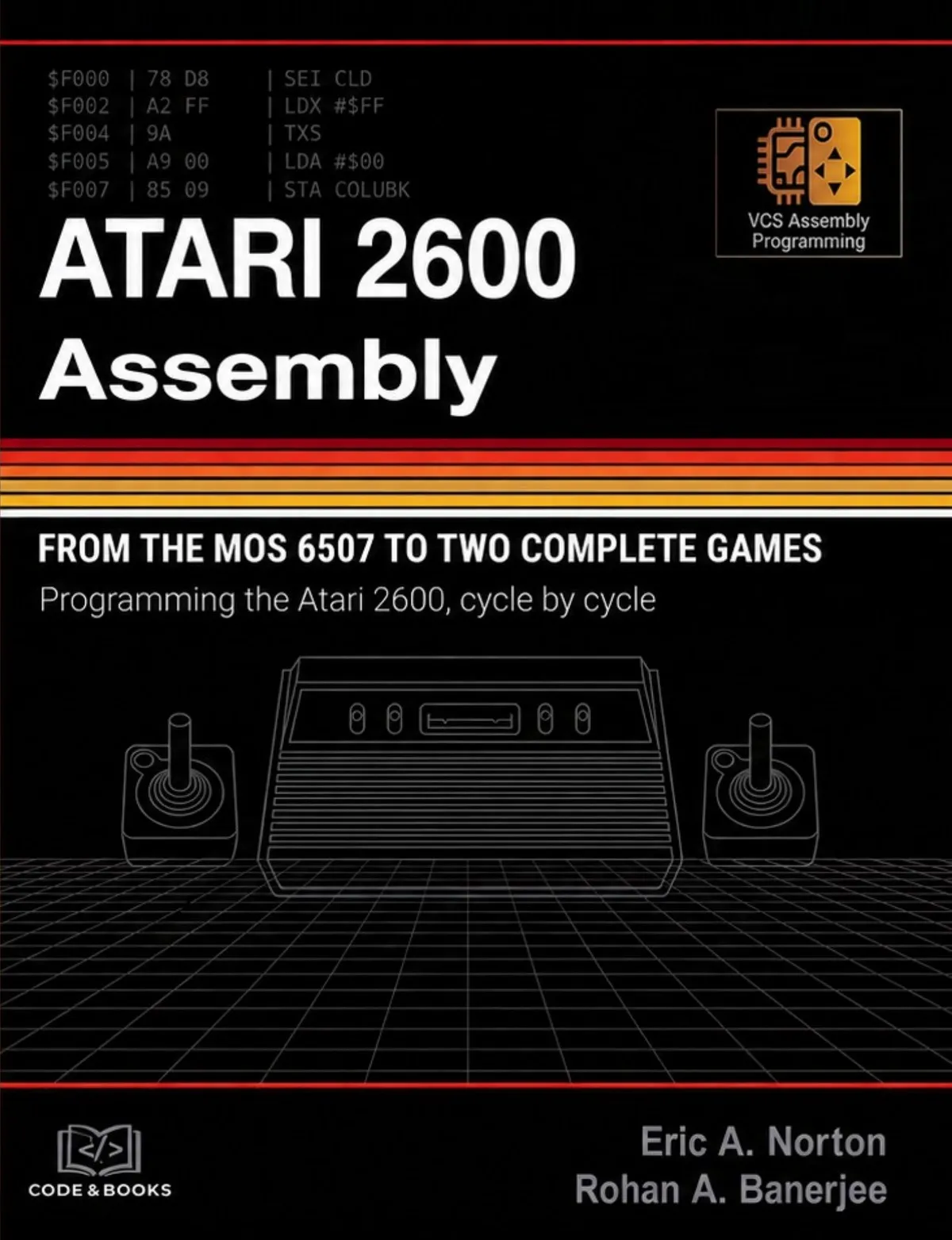
Programming the Atari 2600, cycle by cycle
The Atari 2600 has no frame buffer. It has 128 bytes of RAM, not enough to hold a single line of the picture, and a processor that has to build the image while the beam is already drawing it. On this machine the program is the video generator, and every one of the 76 cycles in a scanline has a price.
This book assumes nothing. Binary and hexadecimal are explained from the beginning. The development environment is installed step by step on Windows, macOS and Linux. Your first cartridge is running before the end of Part I. From there: the 6507 instruction by instruction, the TIA register by register, and two complete games from specification to finished ROM.
For readers who have never written a line of assembly — and for programmers who want to understand the hardest console ever sold.
What makes this book different
Not one picture in this book was drawn in an image editor. Every listing was assembled, run in the emulator and photographed — the broken ones included.
“Where it breaks” takes a classic error, assembles it, and prints the broken screen it really produces, so you recognise it when it happens to you.
Cycle counts, colour charts, timer intervals and sound frequencies were measured on the machine with instrument cartridges written for the purpose.
Every cartridge, its source and the programs that built them are published under the MIT licence, with a program that assembles them again and checks the result byte for byte.
Built in this book
A bat, a ball and a wall of bricks that will not wait. Every two and a half seconds the wall takes a step down the screen, and when it reaches the bat the game is over.
From Atari 2600 Assembly
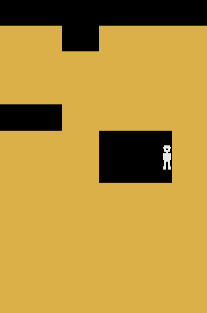
A digger in a mine twice the height of the screen. The map lives in the console's 128 bytes of RAM, so every tunnel he digs stays dug, and the window scrolls to follow him a scanline at a time.
From Atari 2600 Assembly
Contents
Six chapters that take you from knowing nothing about this machine to having a cartridge of your own running in an emulator, with a debugger open beside it. Nothing here assumes previous experience of assembly language, of hexadecimal, or of the Atari 2600 itself. By the end of chapter 6 you will have written code, watched it fail, and found out why.
Almost everything strange about programming the Atari 2600 follows from a single decision taken in 1976 to save a few dollars per console: there is nowhere to put the picture.
Bits, bytes, binary and hexadecimal, explained from nothing — and then used immediately, because on this machine a number is very often a picture.
Three chips, one cartridge, and a map of addresses with fewer lines than it needs — which turns out to explain most of the surprises in the chapters that follow.
Three pieces of software, on whichever operating system you use, and a first cartridge assembled before the end of the chapter. There is a short way and a long way, and it is worth knowing what the short way is doing for you.
Thirty-odd lines that fill a television with one colour — and then, by changing three of them, with a hundred and ninety-two.
The last chapter of Part I is about stopping time. Everything the console does happens too fast to watch and leaves no trace — unless you open the one window that can hold it still.
Nine chapters that leave the television alone and teach the processor: what it keeps, what it can do, how each instruction is written and what each one costs in cycles. It is the least spectacular part of this book and the one that makes everything after it possible — because on the Atari 2600 you do not choose an instruction only for what it does, but for how long it takes.
Six registers, a handful of bytes per instruction, and a rule that decides everything else: the processor can only work on what it is holding.
Most of what a program does is carry bytes from one place to another. This chapter is about the instructions that carry them — and, far more importantly, about the thirteen different ways the processor can be told where to look.
Addition, subtraction and comparison — and the one flag that decides whether all three of them work. More first-day bugs come from the carry than from anything else in this book.
Seven instructions that do not care what number a byte holds, only which of its eight switches are on. On a machine where one bit is one pixel and one bit is one direction of a joystick, they do more work than the arithmetic does.
Until now every listing in this book has run from the first line to the last. This is the chapter in which programs stop being straight lines — and in which the shape of the code starts to cost cycles as surely as the instructions in it do.
How to write a piece of code once and use it from several places — and why, on this console more than on any other, the machinery that makes that possible is something you have to keep an eye on.
The last chapter of the language, and the first that is really about the games. Almost everything an Atari 2600 cartridge contains is a table, and almost everything it does at run time is look something up.
A chapter with no new instructions in it. Everything here is arithmetic — the seventy-six cycles of a scanline, the nineteen thousand of a frame, and how to know where every one of them has gone before you run anything at all.
The last chapter of Part II is about the tool. Everything in it happens before the console has done anything at all — and yet it decides how much of the machine you can reach, because the assembler does for nothing several things that would otherwise cost cycles.
Thirteen chapters in which the television comes back and does not leave again. Everything Part II taught is now spent seventy-six cycles at a time, in step with a beam that will not wait — the playfield, the players, the missiles, the collisions, and the kernels that put them all on the same scanline.
Before the console can be made to draw anything, it is worth knowing what it is drawing on. A cathode-ray television has no memory, no idea what a picture is, and no way of asking your program to slow down.
Chapter 16 described what the television needs. This chapter is the code that produces it — the shape every cartridge in the rest of this book is poured into, and the one piece of a 2600 program that is always the same.
A hundred and twenty-eight of them, named by one byte with two fields in it, and held in four registers that are the first four things any kernel writes to. This is the shortest chapter in Part III and the one you will look things up in most often.
The first object the console can draw, the coarsest, and by a wide margin the cheapest: twenty bits that fill half the screen, and a bit somewhere else that decides what the other half does.
The screen has forty playfield columns and the console has twenty bits to fill them with. This chapter is about the trick that makes up the difference, and it is the first in the book where an instruction has to be in a particular place in the line rather than merely in a particular place in the listing.
The playfield is the scenery. The players are the two things in it that are allowed to move, and they are the first objects in this book with no vertical position register at all — where a player sits on the screen is decided by which scanlines your kernel is awake for.
Every other machine of the period has a register you write an X coordinate into. This one does not. It has a strobe, and the coordinate is the instant you touch it — which turns putting a sprite in a particular place into a problem about cycles, and gives this chapter the strangest mechanism in the book.
Chapter 22 left a machine that can put an object on any pixel and a programmer who has to work out how by hand, every time. This chapter writes the eighteen instructions that do it from a byte of RAM, measures them against every pixel they claim to reach, and then stops thinking about the problem for the rest of the book.
The console owns two players. A game usually wants more than two things, and it wants some of them bigger than eight pixels. One register answers both wishes at a price of five cycles a frame, and understanding exactly what it gives — and what it refuses — is the difference between a crowded screen and a flickering one.
The last three of the five movable objects have no graphics register at all. Each of them is a single bit that says draw or do not draw, and everything else about them — how tall they are, what shape they make, when they appear — is decided by when the processor sets and clears that bit. They are the cheapest things on the machine, and they are the shots, the sparks, the platforms and the walls of almost every game of the period.
Six things can be drawn on this screen, which makes fifteen pairs of them, and the chip keeps one bit for each pair. It sets that bit whenever the two things put a lit pixel on the same colour clock — not near each other, not in overlapping rectangles, on the same pixel. A game that would otherwise spend hundreds of cycles a frame comparing coordinates gets the answer for three cycles and a branch.
Every kernel so far has done its work on every scanline, and most of that work was wasted. A sprite row two scanlines tall looks no different from one drawn twice, and it costs half as much. This chapter spends the cycles that buys — on a moving playfield, on a second sprite, and on the animation that makes a walker walk.
The console has two players and no more, and the screen of a real game has ten things on it. This chapter is the four ways out of that: give a sprite a different colour on every scanline, draw the same object more than once down the screen, draw different objects on alternate frames, and — when two things do land on the same pixel — know which one the chip will show you.
Chapter 17 built a frame by counting: three scanlines of sync, thirty-seven of vertical blank, a hundred and ninety-two of picture, thirty of overscan, and a WSYNC for every one of them. That frame was correct. It was also useless, because a loop that counts scanlines is a loop that is doing nothing else, and a game has to think somewhere. This chapter hands the counting to the other chip in the console and gets those five thousand cycles back.
Everything so far has been one-way. The console has been drawing at a room that never answers. This chapter is the other direction, and it is the shortest hardware chapter in the book: two bytes hold every joystick and every switch on the machine, one bit each holds the fire buttons, and the whole of it can be read in the vertical blank the timer just handed you.
This is the last piece of hardware in the book, and the only one that cannot be photographed. Six write-only registers make every noise the console has ever made: two voices, thirty-two pitches, sixteen waveforms, sixteen volumes. Nothing in the chapter is difficult. What is difficult is discovering, without a debugger and without ears, what those six registers actually do — so the first thing this chapter builds is a way of measuring sound.
Four kilobytes of program is tight. A hundred and twenty-eight bytes of memory is something else: it is the smallest working space of any machine you are ever likely to program, and the stack lives in it too. This chapter measures where those bytes are, what is in them before you arrive, how many of them the stack takes without asking, and what happens on the day it takes one too many.
Chapter 31 measured what the six sound registers do. This chapter builds the thing that writes them: a small engine, called once a frame, that plays a tune on one channel and effects on the other, decides which of them the player hears when both want to be loud, and costs the frame a hundred and sixty-six cycles on its worst day. Everything in it is a table and a counter.
A score is six digits of graphics that have to appear on the same scanline, and the console has two movable objects to draw them with. This chapter builds the kernel that manages it: a font on a page boundary, three bytes of decimal arithmetic, six pointers rebuilt every frame, and a scanline in which the last four stores fall three cycles apart. It is the tightest piece of code in the book so far, and every number in it was read back off the television.
A game needs surprises and the console has nothing to make them out of: no clock, no noise, no unpredictable input except the player. This chapter builds the thing every cartridge of the period used instead — a byte, a shift and one exclusive-or, a sequence of two hundred and fifty-five values that nobody can see the pattern in and the machine can prove things about. Then it takes the one genuinely unpredictable thing on the console and uses it to decide where in that sequence to begin.
Everything the last twenty chapters built draws one screen. A cartridge draws several, in an order the player decides: a title that waits, a game that runs, a pause that holds it still, an ending that stops it. This chapter is the byte that says which of those the machine is in, the twenty-three cycles that turn that byte into a jump, and the one instruction that decides whether a switch held for two seconds counts once or a hundred and twenty times.
Everything from here on is a game. This chapter builds one from nothing: a bat at the bottom of the screen, a ball that will not stay still, and a wall of bricks that comes down towards the player a row at a time. It is five hundred and eleven bytes of code, fifty-seven bytes of memory, and every piece of it has already been built in an earlier chapter. What is new is the arithmetic of a bounce, and the discipline of making a whole frame out of parts that were designed separately.
The second game of the book is set in a mine, and a mine is bigger than a television screen. That one sentence is the whole of this chapter. Everything in it follows from having a world that does not fit: how to keep that world in read only memory without spending all of it, how to show a piece of it, and how to move that piece one scanline at a time while the beam is drawing.
Chapter 38 built a mine and a window that slides over it, and the mine was in read only memory because nothing ever changed it. This chapter puts a man in the mine and gives him a shovel, and the moment the map can change, read only memory is no use and the map has to live in the hundred and twenty-eight bytes. Everything in this chapter follows from that sentence, including the shape of the kernel and including one thing the game cannot do.
Two games are finished and the rest of the book is about getting them out of the workshop. Before that, one chapter about the thing nobody teaches: how to know, before writing a line of it, whether the game in your head will run on this machine at all. It is arithmetic, it takes an afternoon, and it is the difference between a design and a wish.
Four kilobytes is not a design decision, it is a consequence: the processor in this machine has thirteen address lines, and after the television and the memory and the switches have had their share, four thousand and ninety-six of the eight thousand one hundred and ninety-two addresses are left for the cartridge. This chapter is about the cartridges that got round it — not by changing the console, which nobody could do, but by lying to it.
Everything so far in this book has been written for one television: the American one, five hundred and twenty-five lines interlaced, sixty fields a second, the colour carried on a subcarrier at three and a half megahertz. Most of the world did not buy that television. This chapter is about what happens to a cartridge when it is plugged into one of the others, how much of it breaks, and what it costs to fix — which turns out, if the fixing is done at the right moment, to be nine bytes.
Optimisation on this machine is not a matter of taste and it is not a matter of opinion. There are two currencies, both of them small enough to count, and every change you can make either spends one to buy the other or is simply free. This chapter measures twenty-four pieces of code with the console’s own clock, prints the exchange rate, and then says which of the trades are worth making — which is fewer than you would think, and in more places than you would expect.
Everything in this book so far has been photographed out of an emulator, and every number in it has been read back off those photographs. That is a good way to be sure of arithmetic and it is not a way to be sure of a game. An emulator is a model of a console, and the places where the model is kindest are exactly the places where a real console is not. This chapter is about the differences — four of them measured here, the rest described so that you know what you are looking at — and about the kit you need to look for them.
A game is finished when somebody else can play it. Everything up to this point has been between you and the machine; this chapter is about the moment the file leaves your hands and goes to people who cannot ask you what they are supposed to do with it. There is less to it than you would think and more of it is arithmetic than you would expect.
The last chapter ended by asking what is left in this machine. Here is the first of four answers, and it is the one that decides how much of the other three you can afford: a cartridge is four thousand and ninety-six bytes, a game is made of pictures and maps and tunes, and the difference between a game that fits and one that does not is almost never the code. It is the data, and how it is written down.
This machine has no text. It has no character generator, no font in a ROM somewhere, and no way at all of putting a letter on a screen — and yet every cartridge ever sold for it says its own name on the first thing you see. This chapter is how, and it turns out to be one trick with two objects, used for forty years by everybody.
Everything in this book so far has been about the beam. This chapter is about the other part of the frame — the five thousand cycles when the television is not looking — and about the only thing worth spending them on: deciding what the things on the screen are going to do next.
The last four chapters have been about what a cartridge can do. This one is about the only question a player ever asks, which is whether it is any good — and about the small, unglamorous, entirely measurable machinery that decides the answer.
Errata
No errors have been reported for this edition yet.
Found a mistake? Open an issue on GitHub or write to [email protected], with the page number and what it should say.